

A small evidence-backed control register and an explicit list of unresolved risks.
A long checklist can create a false sense of completion. Start with what the organization is protecting and how it could be harmed. Then turn the relevant safeguards into owned practices with evidence that someone can inspect.
Map the assets and the important paths
List customer data, privileged accounts, production access, source code, signing credentials, backups, and the services the business relies on. Record who owns them and where they are administered. Include the less obvious paths: support access, contractors, automation identities, recovery email accounts, and systems somebody created outside the normal purchasing process.
Describe plausible failures in concrete language. A former contractor retains production access; a compromised account can disable backups; a support tool exposes data beyond the customer it is meant to serve. This makes prioritization more useful than beginning with a shopping list of security products.
Make identity and access a lifecycle
Access needs a request, approval, purpose, scope, review, and removal path. Use stronger authentication appropriate to the sensitivity of the account and keep recovery mechanisms in the same review. A privileged account with a weak recovery path is still a privileged risk. Refer to the current official guidance for the service you are configuring.
Test a joiner, a role change, and a departure across the actual systems. Check shared accounts and automation credentials separately. Keep an emergency access route, but define who can use it, how use is recorded, and what happens afterwards. A policy that cannot be carried out during an incident is incomplete.
Look for evidence behind the control
For each important safeguard, write what it is intended to prevent or detect and what would demonstrate it is operating. The evidence might be an enforced setting, a recent access review, a deployment check, or a successful restore exercise. Separate “documented,” “implemented,” and “verified” so a written policy is not mistaken for an operating control.
Keep the evidence current enough for the risk. Record exceptions with an owner, reason, consequence, and review date. This makes gaps visible without pretending that every organization can finish everything at once. Avoid placing sensitive screenshots, account identifiers, or secrets in broadly shared documentation.
Practice the bad day
Ask what happens if an administrator loses access, a credential is exposed, a dependency is compromised, or customer data must be restored. Name the person who coordinates response and the people who can authorize containment. Check that logs and backups remain available when the main system is not.
Run a bounded exercise and record what actually worked. Restoring a file is different from restoring a functioning service with the expected data and access controls. Follow the findings into normal planning. Security work becomes more credible when it produces clear operational evidence rather than a reassuring label.
Offboarding follows every access path
Name an owner who verifies every path, including the ones outside single sign-on.
Put it to work
0 of 7Use these prompts to check your next step. Your marks stay on this device.
Watch for these failure modes
- Treating a historical checklist as a current complete standard.
- Counting security products instead of checking the risks they address.
- Keeping an exception indefinitely because it was once accepted.
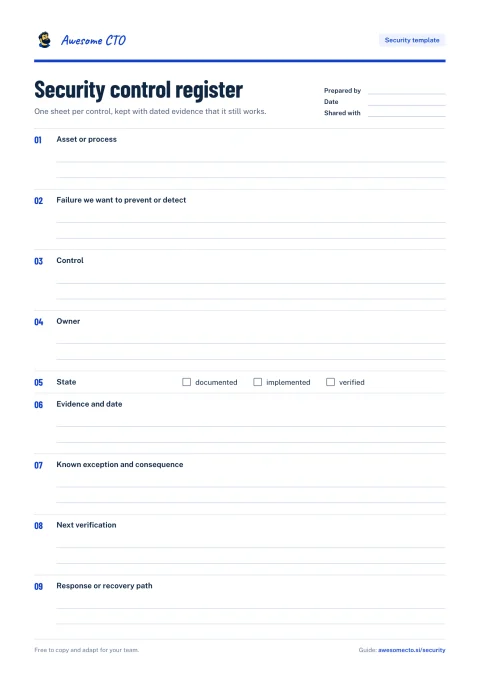
Security control register
One sheet per control, kept with dated evidence that it still works.
9 prompts: Asset or process, Failure we want to prevent or detect, Control, and 6 more.
Security resources
Open the original work directly. Our notes explain what each resource contributes and where its advice needs context.
SaaS CTO Security Checklist
A recovered live source for the Goldfig security checklist, covering people, accounts, applications, and operations.
Awesome Security
A broad security reference collection for finding deeper material once you have identified a specific control or threat.
Technology Due Diligence Checklist
A broad diligence question set spanning product, organization, scalability, and AI/ML operating responsibilities.
Application Security Verification Standard
A structured application-security requirements reference for discussing verification scope with engineers, security reviewers, and suppliers.
OWASP Cheat Sheet Series
Concise application-security implementation references, organized by topic and maintained by security practitioners.
Building Secure & Reliable Systems
Google practitioners connect security and reliability across system design, implementation, operation, incident response, and organizational culture.